Resource Saturdays: Random Word Generators

Hi Everyone!

As you may know by know, I like to use random word generators as inspiration and a general kick-in-the-pants for writing things on the fly. I usually use OneWord, but the other day, OneWord was on the fritz, so I sought ought another random word generator. I’ve posted a few on here before, and you can find them on my Resources page, but these few I just found deserved to be shared as well.

Random Word Generators

Word and Name Generators

This is a really cool generator that will give you random words as well as random names. (By the way, clicking on the screen shots below will take you to that part of the site.)

When you visit the site, on the right side, there is a list of word generators to choose from. It looks like this:
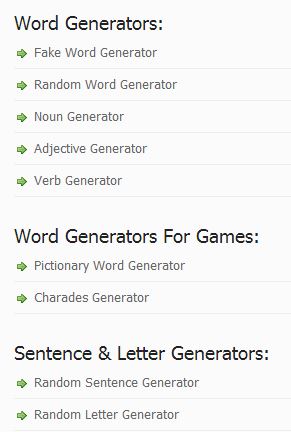
WordGenerator1

The generators are really easy to use. My favorite word generator on this site is the Random Word Generator. It not only gives you a word, but also the definition.
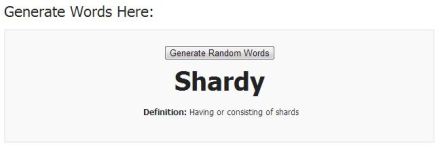
Capture1

This site also has random name generators. Click on Name Generator at the top of the site and you’ll see a list of name generators on the right.

Capture2

As you can see, it’s not just a plain name generator. You can generate all kinds of names here. The part I like is that you can put in a part of the name and have the rest generated if you want. I have a terrible time making up last names for my characters, but I usually know what I want their first name to be.

For example, I’m starting a book where the main character’s name is Jenna. I can’t think of what Jenna’s last name should be. So, I can use the Last Name Generator, enter Jenna as the first name and click Generate.
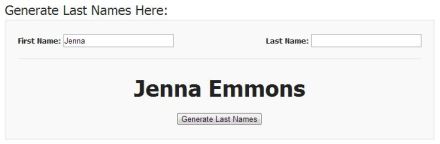
Capture3

Super useful!

Creative Random Word Generator

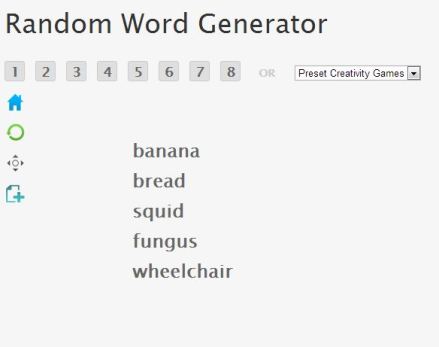
This one is more straight forward, with just some random words being generated. However, you can generate multiple random words at once by clicking on the numbers. Sometimes I find it handy to generate 5 words and try to use them all in my story, chapter, poem, or whatever I’m working on. So I can click on the 5 tile and get 5 words.
Capture4

I might use each word at the start of a paragraph, chapter, scene, or other part of my story to give me a kick in the pants to get going!

I hope you like the resources this week, check back next week for more Resource Saturday goodies!

Happy Writing!

~ Eileen 🙂

Resource Saturdays: How To Write A Book Now

Hi Everyone!

This week, I was looking for some ideas on how to organize my novels and how to better outline the plot and characters. I found a great website that I really think you’re going to like.

How to Write a Book Now

This website has so many great ideas, tips, and hints, that I just had to share it with you this week. From Plot Outlining to Character Development, this site has tons of ideas and advice.

For novel ideas, go to this page and scroll down to the Fun With Plot Summaries section. Some great ideas live here, the possibilities are endless!

Need tips on Character Development, take a peek at this page: How to Create Characters that are Believable and Memorable

Or check out my favorite part, How to Create a Plot Outline in 8 Easy Steps

Finish it all up with Writing an Outline of Your Novel

There are tons of great ideas and tips on this website, I recommend you book mark it, or visit my Resources Page

HowTo WriteABookNow for the link at any time!

Happy Writing!

~ Eileen 🙂

Resource Saturdays: 20 Writing Tools

Hi Everyone!

I was perusing the ‘net for writing tools and found a really interesting piece by Alison Nastasi that lists ’20 Writing Tools of Famous Authors’.  You can find the full article on FlavorWire.com, but I’ve summarized it here for you!


20 Writing Tools of Famous Authors


Many of our favorite writers have a special tool or method they use when writing their incredible works. From typewriters and notebooks to fountain pens and regular pencils, they use them all. Several authors, including Stephen King, use fountain pens because it causes them to write slower and think more when writing out longhand. Another tip about fountain pens is that you are forced to edit more thoroughly when putting your writing into a computer or other word processor.

Mark Twain, one of my personal favorites, designed tabbed notebooks where he would wear off the tabs on pages he had completed so he would know where the next blank page was. I have done a similar technique in compositions books, where I move a slim paper post-it to the next available page so I can turn to it quickly before and idea escapes me! Later in his life, when writing longhand became painful, Mr. Twain dictated his stories.

Jane Austen is one of my all time favorite authors. She used a steno style book and a quill pen with ink that had to stand in the ‘chimney corner fourteen days and be shaken two or three times a day.’ I was delighted by the short article on Jane, you can read the article HERE.

Truman Capote reportedly wrote his first version always in longhand with a pencil. The second version was also in longhand. The third version was typed on special yellow paper. Even in bed, with the typewriter balanced on his knees, he could type 100 words per minute!

Charles Dickens used standard black ink until the 1840s when he switched to blue ink. He often also used blue paper!

J. K. Rowling used loose leaf paper and pen to draft her Harry Potter books. Arthur Conan Doyle used a pen to write his famous Sherlock stories while Agatha Christie used her trusty Remington Home Portable Number 2 typewriter. Young adult author Judy Blume used paper and pencil to write her famous stories. She does use a computer sometimes, but usually likes to print them out and edit with a pencil.

What types of writing tools do you use? I love the feel of writing with a smooth pen on paper. There is something so creative and inspiring about it.

Happy Writing!

~ Eileen 🙂

Resource Saturdays: Creative Writing Prompts

Howdy!

Today I have an interesting one for you. Creative Writing Prompts is a website that has 346 writing prompts. You just hover your mouse over one of the numbers on the site and the prompt pops up in a tip window. I think this is a cool way to do it, so you don’t see the prompt ahead of time and you have to pick at random.

(I’ve also added links to my Resources page.)

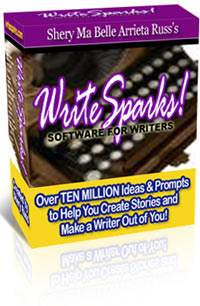
WriteSparks!


Creative Writing Prompts

There’s also a software available on this website for writing prompts. You can download the Lite version for free which is pretty cool or you can, of course, purchase the Gold version for $50.00 or the Premium version for $77.00. Each version includes some pluses and free upgrades, etc. Check out WriteSparks! and test drive the Lite to see if you like it.

From the Creative Writing Prompts website:

Use the creative writing prompts and creative writing ideas to create stories, poems and other creative pieces from your imagination. The writing prompts can even help you come up with creative content for blogs and blog stories.

Check it out and see what sparks your interest.

Don’t forget to share your work with me, I’d love to see it. If I like yours, I’ll post it on my blog for all to see. 🙂

Happy Writing!

~ Eileen 🙂

Resource Saturdays: Scribble

Hey Everyone!

This week I want to share a cool writing tool that I have had bookmarked for a while now. This tool is brought to us by the same guy who made The Story Starter tool. It’s easy to use and pretty helpful.

(I’ve also added links to my Resources page.)

Scribble

Scribble

In April 2012, I shared the Story Starters website with you guys as a great online resource to give you a kick in the pants when you’re trying to think of something to write.  The Scribble website challenges you to create as many words as you can from the random set of letters that get generated when you click the button. However, you could use these randomly generated letters for almost anything! Each letter could be the start of a line in a poem. Each letter could be the start of a paragraph, chapter, sentence, or whatever else you can think of. Depending on what I’m working on, I use this tool for various purposes.

Sometimes, I have been staring at my project for so long, that I just need to put it aside and do something else for a bit. This is a great quick mind-clearing exercise to just write whatever comes to your mind instead of hammering away at your mind-numbing project for just a moment or two. 🙂

From the Scribble website:

Scribble is a word game for kids, adults, families, and classrooms. The goal is to create as many words as you can using the ten letters that are randomly generated in the box. Just scribble down the words on a piece of paper as fast as you can think of them. You can even make it into a contest with your family, classmates or friends. Make up your own rules!

BEWARE: There are 141,167,095,653,376 possible combinations of letters!
(Yes, that’s more than 141 TRILLION combinations.)

See what you can cook up with this generator. Don’t forget to share your work with me, I’d love to see it. If I like yours, I’ll post it on my blog for all to see. 🙂

Happy Writing!

~ Eileen 🙂

OneWord: Timid

Timid
With hope
Stretching forward
Tentatively
Feeling
Reaching
Afraid
Yet daring
To try


******************************************

To learn more about OneWord, visit OneWord.com

My OneWord profile: http://oneword.com/members/eileenmaki/

OneWord: Complexity

The complexity of the situation finally struck home. I looked first at Mark and then to Zan. Both pistols were aimed at my chest. I could feel a bead of sweat trickle down my forehead. Frozen where I stood, I started to laugh.

******************************************

To learn more about OneWord, visit OneWord.com

My OneWord profile: http://oneword.com/members/eileenmaki/

Resource Saturdays: Scriptito

Hello and Happy Saturday!

Today, I have a pretty cool writing tool to share with you guys. I have been  using Scriptito for a while and really love the planning tools for writing. You can also share your work and get feedback on your projects.

(I’ve also added links to my Resources page.)

ScriptitoChromeWidget

Scriptito

Scriptito is a pretty cool tool that allows you to organize your writing and write from anywhere where you can access the internet. I use Scriptito for organizing story thoughts on the go. Chrome has a widget for Scriptito also, so you can have a quick link to Scriptito right on your home page. Here’s a screen shot of my Scriptito:

Scriptito


So you can kind of see how I’m organizing chapters for my “Meet Carrie Grace” book. You can have multiple projects going at the same time. The bookshelf shows you your projects and information about each one such as the current word count, summary (if you’ve entered one) and other quick facts information. Check it out! Here’s the link to sign up for Scriptito: SIGN UP FOR SCRIPTITO.  And here’s a link to FIND OUT MORE ABOUT SCRIPTITO.

From the Scriptito website:

Scriptito wants to enable writers of all skill levels tell their stories – and we think we can do this better than anyone – by accomplishing our two main goals:

We want to enable you to write any time, any where.

The best way to develop or refine your writing skills is to write, and write often. Scriptito leverages the tremendous power of the Internet to enable you to write at the time that’s most convenient to you. Whether you’re at home, on your lunch break, or even at a relative’s house. As long as you have a connection to the Internet and a modern web browser, we’re there for you.

We want to eliminate the distractions so that you can focus on your writing.

With Scriptito, you no longer have to worry about backing up your writing projects, because it’s handled automatically for you – on a continuous basis.

With Scriptito, you have instant access to a wide variety of readers that are looking for an opportunity to review new literature. We make it easy to share your stories with these readers, and gain immediate access to their feedback.

In this day and age, you can no longer assume that your work will be “consumed” by a single device, and you can’t force your readers to come to you, so we make it easy for you to go to them. Scriptito solves this problem by allowing you to focus on the content, and by providing you with the ability to target your writing to one or more of these devices by simply exporting your project to the most appropriate format for that device.

I hope you like Scriptito. Let me know what you think of it in the comments below.

Happy Writing!

~ Eileen 🙂

Resource Saturdays: Language is a Virus

Hello!

This week I have a pretty cool tool for all my fellow writers out there! Today’s resource is a website that has tons of inspiration to be found for writers everywhere.

(I’ve also added links to my Resources page.)

Language Is A Virus

Language is a Virus

This website is chalk full of tools and tips for writers. Among the many tools available are things like the ‘Cut Up Machine’ where you can enter a block of text and “mix it up” to create different mixes of the words. This could be useful if you have specific words you want to use, but aren’t sure of which order they should be in. You could “mix it up” with the phrase or paragraph to see what works best. There are madlibs, poetry gyroscopes, WTF-O-Vision games and many more to cure your writers block, give you a refreshing break from yourself or just have a bit of fun.

Mixed in with all the fun and games are the Writing Exercises. This section contains prompts and generators as well as articles and information on writing. There are exercises and information on Writing Techniques as well as articles on Creative Writing. There are so many tools and resources here, you will definitely want to bookmark this site in your web browser!

Here’s are 5 of my favorite resources on this website:

1. Free NaNoWriMo Word Meter
2. Famous Quotes
3. Free Creative Writing eBooks
4. Steam Punk Name Generator (This one is really a bit of fun! I couldn’t stop clicking the button to generate new names!)
5. Rhyming Dictionary

From the Language is a Virus website:

Languageisavirus.com exists to cure writer’s block and inspire creativity. You can choose from a multitude of writing games, gizmos, generators, writing prompts and exercises, tips, experiments and manifestoes from infamous avante garde writers and how-to articles on fiction writing and poetry.

I hope you find some inspiration! Share your work with me, I’d love to see it.

Happy Writing!

~ Eileen 🙂

Writing your Author’s Bio

Writing your own Bio can be bad news, especially if you hate talking about yourself like I do. Recently, I had to submit both a long and short bio to a publisher. Usually, when submitting articles or short work, I just spin off a quick bio and call it good. But as I get serious about publishing and putting myself out into the world, I decided I needed to write a proper bio. Several hours of research later, I gathered the needed information and set to work.

Here are some of the guidelines and tips I accumulated.

Guidelines:

  1. Always write in third person.
  2. Opening sentence should say who you are, what you do and where you’re from.
  3. Next, include writing education, degrees, courses, etc.
  4. List your experience, ezines, publications, blogs, etc.
  5. If you have a writing niche, list it here. What do you love to write about? How are you qualified to write it?
  6. List any writing groups you’re a member of.
  7. List any writing organizations you’re a member of.
  8. In your conclusion, list current projects.

These guidelines may make it sound like your bio has to be long and windy. It doesn’t. Just list the facts. It should be a short paragraph, not a novel. Some publishers or venues will ask for a longer bio and that’s when you go into the details, but for regular bios, keep it sweet and simple.

Notes and Tips:

  • Keep your Bio on file and update regularly
  • Be simple and honest, but highlight yourself and show your personality

Sample Bio:

Here’s a sample of a short bio –

Jane Smith is a freelance writer from Salem, Oregon. Jane has completed several courses on creative writing, including a program on creative nonfiction. As a lifelong lover of crafts and textiles, she has published many articles on crafting and fabric arts in the Pacific Northwest as well as on her blog: JaneSews.com. Jane is a member of the Oregon Writing Association as well as the National Writer’s Guild. She is currently working on a pattern book for quilters due out from Northwest Press in January 2014.