Writing your Author’s Bio

Writing your own Bio can be bad news, especially if you hate talking about yourself like I do. Recently, I had to submit both a long and short bio to a publisher. Usually, when submitting articles or short work, I just spin off a quick bio and call it good. But as I get serious about publishing and putting myself out into the world, I decided I needed to write a proper bio. Several hours of research later, I gathered the needed information and set to work.

Here are some of the guidelines and tips I accumulated.

Guidelines:

  1. Always write in third person.
  2. Opening sentence should say who you are, what you do and where you’re from.
  3. Next, include writing education, degrees, courses, etc.
  4. List your experience, ezines, publications, blogs, etc.
  5. If you have a writing niche, list it here. What do you love to write about? How are you qualified to write it?
  6. List any writing groups you’re a member of.
  7. List any writing organizations you’re a member of.
  8. In your conclusion, list current projects.

These guidelines may make it sound like your bio has to be long and windy. It doesn’t. Just list the facts. It should be a short paragraph, not a novel. Some publishers or venues will ask for a longer bio and that’s when you go into the details, but for regular bios, keep it sweet and simple.

Notes and Tips:

  • Keep your Bio on file and update regularly
  • Be simple and honest, but highlight yourself and show your personality

Sample Bio:

Here’s a sample of a short bio –

Jane Smith is a freelance writer from Salem, Oregon. Jane has completed several courses on creative writing, including a program on creative nonfiction. As a lifelong lover of crafts and textiles, she has published many articles on crafting and fabric arts in the Pacific Northwest as well as on her blog: JaneSews.com. Jane is a member of the Oregon Writing Association as well as the National Writer’s Guild. She is currently working on a pattern book for quilters due out from Northwest Press in January 2014.




Writer Resource: iWriter

If you are looking to make a little extra money doing something you love (writing), then iWriter is a great resource for you.

iWriter is a forum that posts writing jobs from clients and you can register as a writer and pick items to work on. There are three levels of ‘Writer’ that you can achieve. When you first join, you earn the lower rates, of course, until you achieve high feedback rankings with clients. This can take a lot of time, or you can do the Fast Track program to earn a higher Writing rank faster.

iWriter lists writing jobs for articles, eBooks, and reWrites. They can vary in length greatly, depending on what the client needs. There is an excellent tutorial on how to use the site located at the bottom of the page HERE. iWriter pays writers via PayPal and you can choose how often and when you get paid from four different choices.

Payment options are:

  • Weekly (Tuesdays)
  • Every 2 weeks (Every other Wednesday)
  • 5th of the month
  • 25th of the month

Completed articles are checked for uniqueness and spelling/grammar. So, do your best work. Clients do have the option of rejecting your work if it does not meet their criteria or is poorly written.

Each assignment listed on the board has specific requirements. You can choose specific topics like Automotive or Technology and then each client will have keywords or instructions for how they want the piece written.

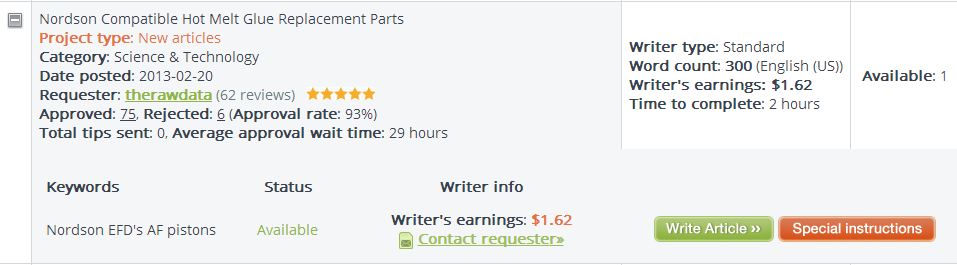
So, just to give you an example, you can view the job board and filter and limit the jobs by your criteria. Or, you can just view all jobs. Once you see one you are interested in, the listing appears like this:

iWriter Order Summary

You can view additional information about the order by clicking on the gray plus sign in the top left corner of each listing. Clicking on the gray plus sign button will show additional information like this:

iWriter Order Summary Expanded

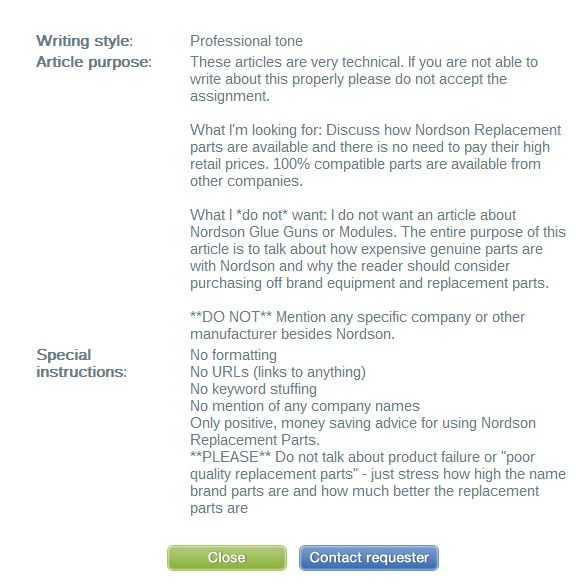
So you can now view the keywords available. If this client had more than one order, you could see all the orders from this client at the same time by clicking the gray plus sign button. Now, you can click on the Special Instructions button to view the specifics on the order. Here is an example of Special Instructions:

iWriter Order Detail

This particular example is pretty specific, but many of the orders don’t have any special instructions other than using a specific keyword. If you decide you would like to write this order, close the Special Instructions by clicking on the green Close button. Then, you can click on the green Write Article button.

Each order has a time limit and you must complete the order in that time frame. Sometimes, the time limit is only a few hours, so make sure you will be able to finish the order in the time frame allowed.

The more orders you write that are accepted and receive good feedback, the higher your writer ranking will become. Once you have completed, 30 reviews with a 4 out of 5 rating or higher, you will be a Premium Writer and will get paid more for your writing. From there, you will need to get 30 reviews at the Premium level and have a 4.6 rating overall to gain the Elite Writer ranking and get paid even more for your writing.

In all, it’s a pretty cool resource for earning money with your writing. I write a few articles in my ‘spare time’ and get a few hundred dollars a month. It doesn’t pay all the bills, but it definitely covers a few.

Check it out. iWriter.com

Rhyming Resource

I’m writing a little poem for a birthday card and on this occasion, I am rhyming. A quick search found a great, free online resource for help finding rhyming words.

Rhyming isn’t very hard,
If you use this online tool,
I wish I had this to use,
When I was in grade school!


Rhyming Website


Happy Writing!


writers-desk-1024x768

Smashwords

For those of you Indie authors out there who are seeking to self-publish, I want to share a website with you called Smashwords.

Smashwords is a site where you can publish your eBook or other content to multiple retail outlets at once. Smashwords allows you to distribute your work to the Apple iBookstore which serves over 50 countries, Barnes & Noble, Kobo (which powers other retailers as well), Sony, Baker & Taylor (which serves Blio.com and the Axis360 public library platform), and the Diesel eBook Store.

Smashwords offers many tools and opportunities for those wishing to self-publish their work. Among the tools offered are:

  • We make it fast, free and easy to publish an ebook!
  • World’s largest indie ebook distributor
  • 185,000+ titles published by 50,000+ authors and publishers
  • 85% net back to the author/publisher/agent
  • Upload your book once and enjoy distribution to multiple retailers.  Spend more time writing and less time managing multiple retailer platforms.
  • We provide simple, step-by-step instructions that make it free and easy for anyone to create, publish and distribute an ebook.
  • Distribution to libraries
  • FREE ISBNs
  • FREE ebook conversion to nine formats from a Word .doc
  • FREE unlimited anytime-updates to book and metadata
  • FREE consolidated sales reporting simplifies year-end tax reporting
  • FREE centralized metadata management
  • FREE exclusive marketing and selling tools such as our Smashwords Coupon Manager!

Smashwords allows any genre and the following formats:

  • Personal Memoirs
  • Short Fiction
  • Long Fiction
  • Essays
  • Poetry
  • Screenplays
  • Anything else you can write in a word processor!

Registering for a Smashwords account and publishing with them is free, so you don’t have to worry about being charged. You keep all the rights to your material and the publishing option with Smashwords is non-exclusive.

You can publish in Amazon and Smashwords both provided you are not using the Direct option with Amazon which has specific requirements.

Read more about Smashwords here: Smashwords Q & A

They have a Smashwords Style Guide which you can download free: Smashwords Style Guide

Smashwords also offers free books on:

The Secrets to ePublishing Success

Smashwords Book Marketing Guide

and more! Sign up for a free Smashwords account to gain access to their free tools and tips as well as publish your work.

Sign Up for Smashwords

Smashwords

Writing Resource: Story Starters

Hey everyone!

I have another writing resource I’d like to share. 🙂 Years ago, I used to use a title, subject generator. It was great to get me started on something. I have one of those brains that just jumps to an idea given one word (hence OneWord), picture, etc.

Getting back into writing, I searched for that generator I ad used all those years ago without any luck. But, I did find another one that is helpful as well. Yay! It’s called Story Starters. You can find it HERE. Sometimes the starter is completely unusable, but most of the time the starter is at least thought provoking enough to get your creative juices flowing.

Here’s two examples of starters I generated:

1. The slow zoo keeper boiled a potato in the White House for the Russians.

2. The cool principal produced a movie in the playground to wake up the President.

So, as you can see, the usability of the starter as it is presented may not be the best, but with a generator, you take what you can get. 🙂 And at least it gets your thoughts moving in the right direction.

Thanks to Joel Heffner for getting the generator up and running for us and offering it for FREE! There is also a Story Starter for kids HERE.

Happy Writing! 🙂


Story Starter Site Clip

Writing Resources

Ok, so I’m doing some web search this afternoon and I am coming across a whole butt load of information.  It’s too much info for me to take in alone.  So, I decided to share.  Here’s just a few of the great writing resources I have either found today or use regularly:

About.com – Freelance Writing

Write to Done

Funds for Writers

The Muffin

Freelance Switch

Check these out.  You won’t be sorry!

🙂