Writer Resource: iWriter

If you are looking to make a little extra money doing something you love (writing), then iWriter is a great resource for you.

iWriter is a forum that posts writing jobs from clients and you can register as a writer and pick items to work on. There are three levels of ‘Writer’ that you can achieve. When you first join, you earn the lower rates, of course, until you achieve high feedback rankings with clients. This can take a lot of time, or you can do the Fast Track program to earn a higher Writing rank faster.

iWriter lists writing jobs for articles, eBooks, and reWrites. They can vary in length greatly, depending on what the client needs. There is an excellent tutorial on how to use the site located at the bottom of the page HERE. iWriter pays writers via PayPal and you can choose how often and when you get paid from four different choices.

Payment options are:

  • Weekly (Tuesdays)
  • Every 2 weeks (Every other Wednesday)
  • 5th of the month
  • 25th of the month

Completed articles are checked for uniqueness and spelling/grammar. So, do your best work. Clients do have the option of rejecting your work if it does not meet their criteria or is poorly written.

Each assignment listed on the board has specific requirements. You can choose specific topics like Automotive or Technology and then each client will have keywords or instructions for how they want the piece written.

So, just to give you an example, you can view the job board and filter and limit the jobs by your criteria. Or, you can just view all jobs. Once you see one you are interested in, the listing appears like this:

iWriter Order Summary

You can view additional information about the order by clicking on the gray plus sign in the top left corner of each listing. Clicking on the gray plus sign button will show additional information like this:
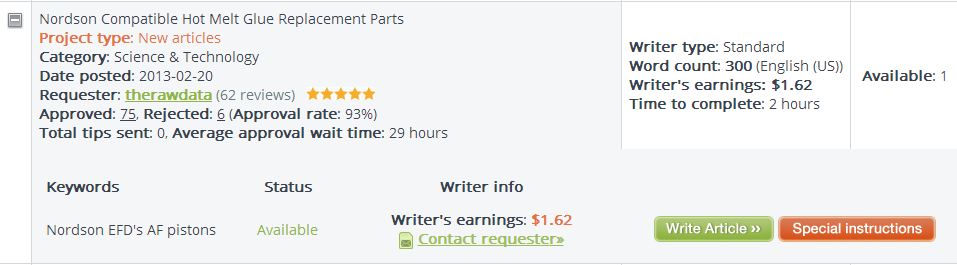
iWriter Order Summary Expanded

So you can now view the keywords available. If this client had more than one order, you could see all the orders from this client at the same time by clicking the gray plus sign button. Now, you can click on the Special Instructions button to view the specifics on the order. Here is an example of Special Instructions:
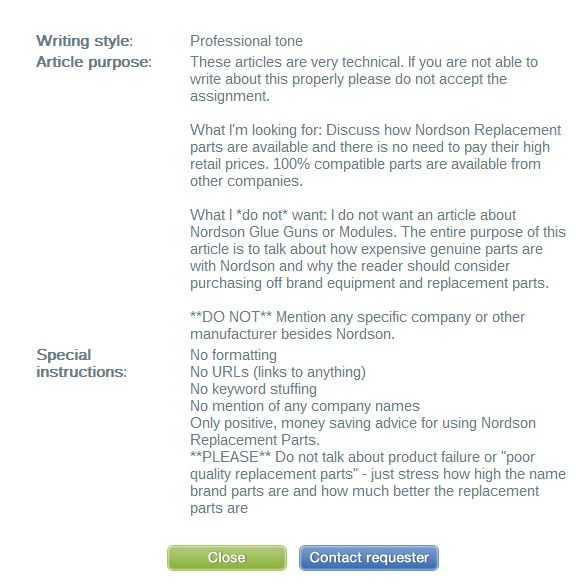
iWriter Order Detail

This particular example is pretty specific, but many of the orders don’t have any special instructions other than using a specific keyword. If you decide you would like to write this order, close the Special Instructions by clicking on the green Close button. Then, you can click on the green Write Article button.

Each order has a time limit and you must complete the order in that time frame. Sometimes, the time limit is only a few hours, so make sure you will be able to finish the order in the time frame allowed.

The more orders you write that are accepted and receive good feedback, the higher your writer ranking will become. Once you have completed, 30 reviews with a 4 out of 5 rating or higher, you will be a Premium Writer and will get paid more for your writing. From there, you will need to get 30 reviews at the Premium level and have a 4.6 rating overall to gain the Elite Writer ranking and get paid even more for your writing.

In all, it’s a pretty cool resource for earning money with your writing. I write a few articles in my ‘spare time’ and get a few hundred dollars a month. It doesn’t pay all the bills, but it definitely covers a few.

Check it out. iWriter.com

Smashwords

For those of you Indie authors out there who are seeking to self-publish, I want to share a website with you called Smashwords.

Smashwords is a site where you can publish your eBook or other content to multiple retail outlets at once. Smashwords allows you to distribute your work to the Apple iBookstore which serves over 50 countries, Barnes & Noble, Kobo (which powers other retailers as well), Sony, Baker & Taylor (which serves Blio.com and the Axis360 public library platform), and the Diesel eBook Store.

Smashwords offers many tools and opportunities for those wishing to self-publish their work. Among the tools offered are:

  • We make it fast, free and easy to publish an ebook!
  • World’s largest indie ebook distributor
  • 185,000+ titles published by 50,000+ authors and publishers
  • 85% net back to the author/publisher/agent
  • Upload your book once and enjoy distribution to multiple retailers.  Spend more time writing and less time managing multiple retailer platforms.
  • We provide simple, step-by-step instructions that make it free and easy for anyone to create, publish and distribute an ebook.
  • Distribution to libraries
  • FREE ISBNs
  • FREE ebook conversion to nine formats from a Word .doc
  • FREE unlimited anytime-updates to book and metadata
  • FREE consolidated sales reporting simplifies year-end tax reporting
  • FREE centralized metadata management
  • FREE exclusive marketing and selling tools such as our Smashwords Coupon Manager!

Smashwords allows any genre and the following formats:

  • Personal Memoirs
  • Short Fiction
  • Long Fiction
  • Essays
  • Poetry
  • Screenplays
  • Anything else you can write in a word processor!

Registering for a Smashwords account and publishing with them is free, so you don’t have to worry about being charged. You keep all the rights to your material and the publishing option with Smashwords is non-exclusive.

You can publish in Amazon and Smashwords both provided you are not using the Direct option with Amazon which has specific requirements.

Read more about Smashwords here: Smashwords Q & A

They have a Smashwords Style Guide which you can download free: Smashwords Style Guide

Smashwords also offers free books on:

The Secrets to ePublishing Success

Smashwords Book Marketing Guide

and more! Sign up for a free Smashwords account to gain access to their free tools and tips as well as publish your work.

Sign Up for Smashwords

Smashwords

Writing Resource: Story Starters

Hey everyone!

I have another writing resource I’d like to share. 🙂 Years ago, I used to use a title, subject generator. It was great to get me started on something. I have one of those brains that just jumps to an idea given one word (hence OneWord), picture, etc.

Getting back into writing, I searched for that generator I ad used all those years ago without any luck. But, I did find another one that is helpful as well. Yay! It’s called Story Starters. You can find it HERE. Sometimes the starter is completely unusable, but most of the time the starter is at least thought provoking enough to get your creative juices flowing.

Here’s two examples of starters I generated:

1. The slow zoo keeper boiled a potato in the White House for the Russians.

2. The cool principal produced a movie in the playground to wake up the President.

So, as you can see, the usability of the starter as it is presented may not be the best, but with a generator, you take what you can get. 🙂 And at least it gets your thoughts moving in the right direction.

Thanks to Joel Heffner for getting the generator up and running for us and offering it for FREE! There is also a Story Starter for kids HERE.

Happy Writing! 🙂


Story Starter Site Clip

How Buddhists Worship

Buddhism

Buddhist Temple

Buddhism was founded by a man who went by the name Siddhartha Gautama. Siddhartha was born into a wealthy family who was involved in the leadership of the tribe in which they resided. Siddhartha was originally slated to succeed his father as the tribal leader upon his passing. From an early age, Siddhartha was sheltered from the outside world and taught only what he would need to know in order to be a good ruler. As Siddhartha got older, he began to question his station in life and why he had more than others did. Later, as a father and husband, Siddhartha left his life to begin his journey into enlightenment.

Siddhartha traveled through many regions and tribes, seeking the honesty of the meaning of life. After many years of traveling and fasting, Siddhartha was no closer to finding the answers he sought. Sitting under a tree to meditate and rest, Siddhartha entered a deep trance and awoke enlightened. Henceforth, he went by the name Bodhi which literally means ‘enlightened one’.

Buddhism is the most popular religion in many Asian countries. Buddhism began in the northeastern areas of India and is believed to have begun over 2,500 years ago. It is estimated that there are over 350 million Buddhists in the world as of the year 2011. After the initial rise and fall of Buddhism in India, Buddhism resurfaced in Japan and has flourished there.

The goal of Buddhism is to become enlightened. It is not to worship a particular god or being. The focus of Buddhism is not how life began or who is watching over us from above. Buddhists do not believe in one omnipotent being. Nor do they believe that several gods and beings govern our lives or our interactions with those around us. Buddhism concentrates on reaching a state of Nirvana, or enlightenment.

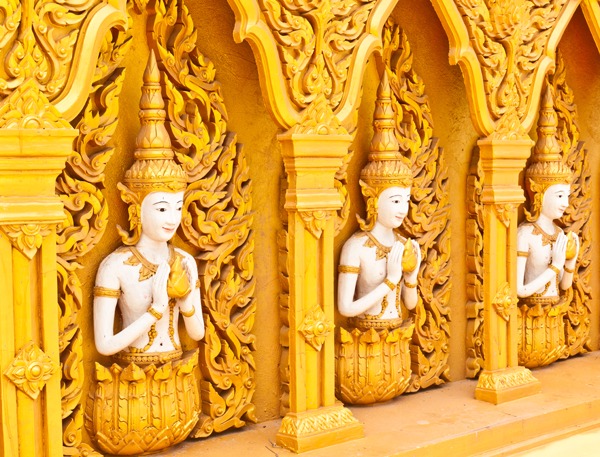
Buddhists worship in several different ways. Buddhists generally have a shrine in their homes containing a Buddha statue, candles, and incense. Buddhists also worship in temples. Temples can look very different, appearing in different shapes and sizes. The one thing that Buddhist temples have in common is statues of Buddha. All Buddhist temples have at least one statue of Buddha somewhere in the temple and are designed and built to represent the five elements of life. The five elements are: Fire, Air, Earth, Water, and Wisdom.

Worshipping for a Buddhist is referred to as ‘puja’. Puja involves chanting and offerings of purified water, incense, flowers and candles at the shrine. The purpose of puja is to thank Buddha for sharing his knowledge with the world, thanking him for his teachings.

Typical Buddhist worshipping includes sitting barefoot on the floor in front of an image of Buddha, usually a statue. Worshippers listen to Buddhist monks who chant from religious texts. These worshipping session can be accompanied by musical instruments and contribute to the prayers.

oDesk Profile

Check out my oDesk profile at:

https://www.odesk.com/users/~~75558617077a41ea

oDesk is a great resource for Freelance Work in many different categories.  Check it out.  If you want to join, send me your e-mail address and I will send you an invite from the oDesk site!