
If you are looking to make a little extra money doing something you love (writing), then iWriter is a great resource for you.
iWriter is a forum that posts writing jobs from clients and you can register as a writer and pick items to work on. There are three levels of ‘Writer’ that you can achieve. When you first join, you earn the lower rates, of course, until you achieve high feedback rankings with clients. This can take a lot of time, or you can do the Fast Track program to earn a higher Writing rank faster.
iWriter lists writing jobs for articles, eBooks, and reWrites. They can vary in length greatly, depending on what the client needs. There is an excellent tutorial on how to use the site located at the bottom of the page HERE. iWriter pays writers via PayPal and you can choose how often and when you get paid from four different choices.
Payment options are:
- Weekly (Tuesdays)
- Every 2 weeks (Every other Wednesday)
- 5th of the month
- 25th of the month
Completed articles are checked for uniqueness and spelling/grammar. So, do your best work. Clients do have the option of rejecting your work if it does not meet their criteria or is poorly written.
Each assignment listed on the board has specific requirements. You can choose specific topics like Automotive or Technology and then each client will have keywords or instructions for how they want the piece written.
So, just to give you an example, you can view the job board and filter and limit the jobs by your criteria. Or, you can just view all jobs. Once you see one you are interested in, the listing appears like this:

You can view additional information about the order by clicking on the gray plus sign in the top left corner of each listing. Clicking on the gray plus sign button will show additional information like this:
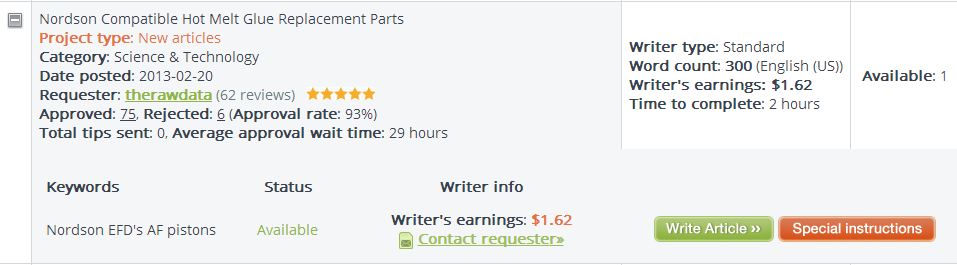
So you can now view the keywords available. If this client had more than one order, you could see all the orders from this client at the same time by clicking the gray plus sign button. Now, you can click on the Special Instructions button to view the specifics on the order. Here is an example of Special Instructions:
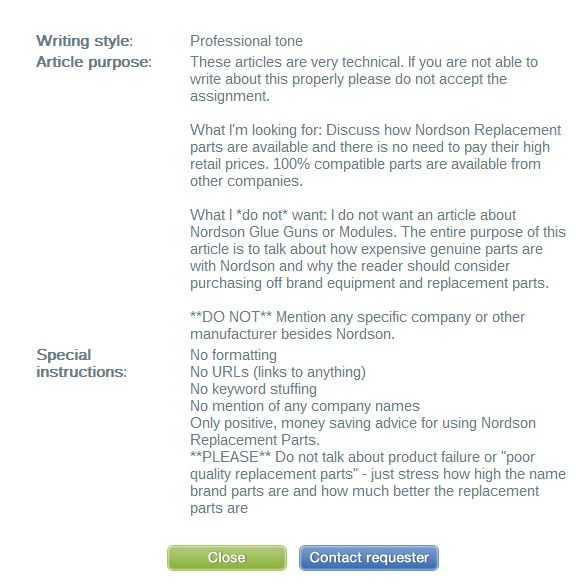
This particular example is pretty specific, but many of the orders don’t have any special instructions other than using a specific keyword. If you decide you would like to write this order, close the Special Instructions by clicking on the green Close button. Then, you can click on the green Write Article button.
Each order has a time limit and you must complete the order in that time frame. Sometimes, the time limit is only a few hours, so make sure you will be able to finish the order in the time frame allowed.
The more orders you write that are accepted and receive good feedback, the higher your writer ranking will become. Once you have completed, 30 reviews with a 4 out of 5 rating or higher, you will be a Premium Writer and will get paid more for your writing. From there, you will need to get 30 reviews at the Premium level and have a 4.6 rating overall to gain the Elite Writer ranking and get paid even more for your writing.
In all, it’s a pretty cool resource for earning money with your writing. I write a few articles in my ‘spare time’ and get a few hundred dollars a month. It doesn’t pay all the bills, but it definitely covers a few.
Check it out. iWriter.com

 Eileen Maki