Writing Resource: Random First Line Generator

If you’ve been following me for a while, you know I like to use random generator tools to spur ideas for quick and spontaneous writing. Some people find it difficult to think of something to write when they are under pressure even if it’s self-imposed pressure. However, I find doing writing exercises regularly that are prompted by a random generator of some sort keep my writing skills sharp. I can pretty much write something worthwhile at the drop of a hat now. All it takes is some regular practice.

Today’s resource that I would like to share with you generates an entire line randomly when you click the button. It’s on the Writing Exercises website which you can find HERE. There are several generator tools to choose from and they are all pretty great. For example, from the home page, you can select a Random Quick Plot Generator. When I used that tool, this is what I got.

QuckPlotGenerator

Right away my mind begins spinning off into the setting for the opening scene in which my young man is standing on a cliff ready to jump, the wind whipping his blond hair off his forehead to reveal his royal blue eyes and the police are after him. Then there is a ‘4 Days Earlier’ transition into the meat of the story. I can’t wait to write it!

One of my favorite tools on this site is the Random First Line Generator. This tool just gives you the first line of your piece and then you’re off! I like to use generator tools in conjunction with my Write or Die Desktop Edition (there is a free web app version too). I set a time or word limit and pound away on my keyboard until I hit my set goal. Sometimes I stop there and sometimes I keep going. Other times I set it aside so I can think about it and add more to it later. Whatever you decide to do with your piece of writing, it’s an excellent way to get your juices flowing.

Here’s what my First Line came out as:

FirstLineGenerator


And here’s what I wrote in 5 minutes. (This is completely unedited.)

# # # # #

There was nothing left of the money except what lay on the table. Hank looked at the paltry stack of bills and felt his anger rising up into his face. He took a deep breath and trained his eyes on Marney.

“This is it?” He tried to control his fury, but it seeped out through his teeth like smoke.

She nodded silently, afraid to meet his eyes.

“Look at me.”

Her head came up inch by inch, her fresh shiner a grim reminder that Hank was back home and he was in charge. Her arms twitched, grabbing onto each other for comfort, her hands flitting up and down her too thin arms like dying birds.

“This is all that’s left?” He growled at her.

“Yes.” She said, tears leaking from her eyes. She nodded. “Yes. That’s all.” She waved a small hand at the paper on the table.

The silence was pregnant with unpent rage.

“There were bills, Hank. ” She stammered. “And Malorey . . . needed school . . . clothes and supplies . . .” Her voice trailed off, knowing Hank didn’t care about what their daughter needed to raise above the filth and poverty they both had grown up in.

“Damn it, Marney. I needed that money!” He yelled, slamming his fist onto the formica table top.

The paper bounced once and rolled over onto its side before it fell with a plop onto the kitchen floor. Before Marney’s eyes could get from the money on the floor to Hank’s face, she felt his fist pound into her cheek.

She opened her eyes. The money was inches from her face, his boots were coming closer and Marney began to cry.

# # # # #

I like to use generators and a 5 minute timer on my Write or Die to get myself warmed up. Then I get to work on my novel. Or sometimes, I use the generator as a blog post topic AND a writing warm up to boot!

Happy Reading and Happy Writing!

~ Eileen 🙂

Poetry line generator

Poets Online: Line Generator Tools

If you’re a poet, or even if you’re not, the Muse can elude even the best of us at times. If you’ve been following me for any period of time, you know I’m fond of all kinds of generators for inspiration. Although most of my current writing is fiction, my first love was Poetry and I still write poetry from time to time. Today, I felt like putting my poet’s hat on, the one with the jaunty feather, and sharing a cool line generator I found.

Clicking this link, Poets Online, will take you to the Poets Online website and specifically to the First Line Generator. There is a version two of the generator as well, if you’re interested in that. However, clicking the button that says ‘Click here to generate a line’  will result in a line of text being displayed in the box. The line of text is intended to be used as the first line of your poem or as inspiration for your poem.

Here’s the line I got the first time I clicked the button:

Poets Online 1


For some reason, I imagined astronauts in the 1960s going on their mission to the moon. I”m not sure where that came from, but here’s what I wrote:


Beyond

Before the moment of our imagination

the men journey,

Their feet echoing hollowly

and leaving no mark on

sterile floors

The journey, the mission

one to share and not own

Amid inky night and

burning flames

One step for man

watched by all

dreamed by all.

Returning, a fallen angel

a return to grace

Under a cloudless sky


Happy Writing!

~ Eileen 🙂

Using Cards to Outline Your Story

Story Cards

When I am writing something, whether it is a novel, a series of novels, or a short story, I like to outline things first. Outlining is a way to organize your thoughts and theories and keep yourself motivated throughout the story. Outlining also helps you keep on topic and not go off on a tangent that does not contribute to the story as a whole. Sub-plots are ok, but can be cumbersome if they get away from you.

There are many ways to outline your story. Some people prefer the traditional method of roman numerals and indented numbers on a piece of paper. That works and is totally fine. I don’t use that method, myself, because if I want to move something around in my outline, it is difficult to do so with an outline written on paper. Another way to do your outlining is with cards. These can be index cards, cardstock you cut into pieces, or any other method you like. The idea is to write one idea on the card, just like you would for one line item in a paper outline. Once you have some ideas written down, put the cards in the order they would appear in the story.

For example, a very simple story outline in the traditional method might look like this:

TOMMY GOES TO THE STORE

I. Tommy decides to go to the store

A. Tommy gets his shoes on

1. Tommy can’t find his wallet

B. Tommy searches house for wallet

2. He finds a gun under his brother’s bed


And the outline could go on and on. But for demonstration purposes, I’ll stop there. As you can see, one major story idea is on each line. Now, with story cards, each of the lines above (except for the title, really) would go on its own card. Then I would arrange them in the order I want them to appear in the story, just like the order shown above with the traditional method.

Now let’s say as I work with the story, I decide that Tommy needs a reason to go to the store, so I want to add something to the top of my outline. If I have this all written down on a piece of paper in the traditional method, I now have to rewrite the outline, write my new idea below with arrows pointing to the top of the outline, or do some other awkward things on paper to indicate where I want the new idea to fit into the outline. Using story cards, I can just write the new idea on a card and insert it in the front of the cards where I want the new idea to appear in the story.

There are many outlining tools, books on outlining stories, and other resources available in the world. In fact, if you Google ‘story outlining tools’, you’re likely to find a big list of free resources, articles, and recommendations on the web. There are tons of technology applications created for writers that allow you to use a virtual method for outlining and story carding.

I use two tools that I absolutely love. Now, I’m a geek, so I prefer technological tools. (I do use pen and paper when I’m not around a computer.) I use the writing software Scrivener for most of my writing. Scrivener has a card tool that I love to use when outlining my stories. You can put ideas on cards, view the corkboard and drag them around to rearrange things, add or delete information from the cards if you like, color code the cards, and other functions. Here’s what the Scrivener story board might look like if I used it for the example above.

Scrivener Story Cards Demonstration

Scrivener is available for both Windows and Mac users. You can get more information about Scrivener on their website, here: Scrivener Website

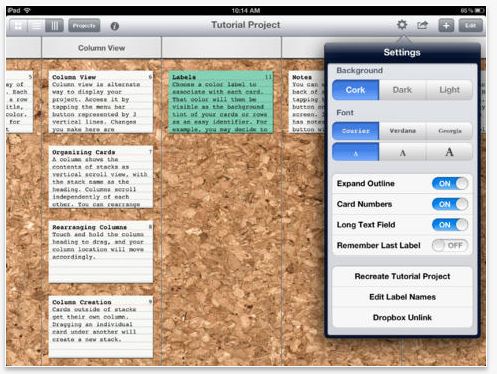
The other tool I like to use is on my iPad. While Scrivener is a full-service tool that allows you to outline, write, export, print and organize your writing pieces, this tool is just for story carding or outlining. It’s called simply, Index Card and is available through iTunes. At the time I’m writing this article, the application is $4.99 USD. You can read about the features and purchase the app here: Index Card App

It’s excellent for outlining on the go. If you have Scrivener for the Mac, you can sync your Index Card work with your Scrivener app. You can print an outline from the Index Cards app, create a color coded visual outline document, and other cool features.  Here’s what a sample screen in the Index Card App looks like:

Index Card Sample


No matter which method or tool you use, outlining is an excellent way to keep you organized and motivated in your story.

Happy Writing!

~ Eileen 🙂

Book Review: The Poets and Writers Guide to Literary Agents

The Poets and Writers Guide to Literary Agents

[Kindle Edition}

This book is a collection of articles from literary agents with tips and hints for the author who wants to land an agent. I found the insight and tips very helpful and plan toput a lot of the information to good use.

If you’re anything like me, you get bored reading ‘scholarly’ or ‘educational’ information. I need to know the details of how to find a good agent, where the agents are looking, and how best to approach an agent but it’s not as exciting as a piece of fiction. This book, with its collection of essays, articles, and interview snippets, allowed me to get the information I needed in bit sized pieces so I was not overwhelmed and did not lose my place.

If you are looking for information on obtaining an agent, this is a good read.

Here’s the official book description from Amazon.com:

Searching for an agent?

Poets & Writers is here to help. A collection of articles edited by the staff of Poets & Writers Magazine, this handy resource includes straightforward advice from professionals in the literary field and additional resources with insider tips.

This practical guide will give you everything you need to understand what agents do, what you can expect from them, and how to find the best agent for you and your work:

Where agents search for new talent
Tips on how to secure an agent
What agents look for in the first few pages of a submission
How to follow up with an agent after you’ve submitted your work
The agent’s role in today’s publishing industry
How to know when the time has come to dissolve a relationship with an agent

The Poets And Writers Guide To Literary Agents

If you read it or have read it in the past, let me know what you think of this book in the comments below.

Happy Writing & Reading!

~ Eileen 🙂

Don Jon Generators

Writing Tool

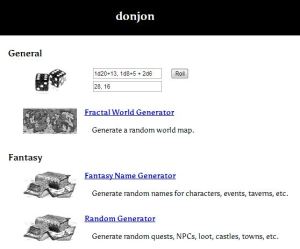
I’ve been writing some fantasy geared pieces lately and I was at a name block that I could not get over. So, I went to Google, of course and found several tools I found useful. One super cool tool website I found is called Don Jon. 

While some of the generators and tools here are specifically geared towards science fiction and fantasy, others could be used for regular fiction purposes or general writing prompts.

I always have a hard time thinking up names for characters that are not boring but also not off-the-wall weird and unpronounceable. These name generators give lots of options to choose from and I can find several useful and pleasing names within seconds.

Pop on over by clicking the Don Jon link above or the screenshot below!

donjonwebsite

Happy Writing!

~ Eileen 🙂

Story Dice

Story Dice: Tree, Couple, Umbrella

I love finding new writing tools. I found an app on for my iPhone that is story dice. You’ve probably heard of Story Dice. They have pictures on them and you roll the dice and try to use the pictures in your story or other writing piece.  The app I have been using is from Thinkamingo and it cost me $1.99 from the App Store. I like it because I can set the app to roll up to 10 dice if I want to.

I love the idea of story dice. You can use one picture in each paragraph, use it to think up a title, characteristics, almost anything. They are very versatile. So this week I rolled 3 dice and got a Tree, a Couple, and an Umbrella. So here’s what I wrote:

We were married beneath the reaching branches of a majestic oak tree but when you were buried I stood alone beneath an umbrella. I’m ashamed to admit that part of me was glad you were gone. Now I had no one to hold me back from my mission, no one to keep safe and no one to care if I was not.

I had loved in your life like I had loved no other and now in death your memory made me soft and so I cast it aside and said goodbye. I didn’t need you where I was going and I certainly didn’t want you there. I closed my umbrella and left it with you.

Walking to the waiting car the rain poured all around me, dropping to the already wet ground. My feet sloshed through the soggy grass, mud coming up and over the side of my loafers. Instead of overflowing, I took it in.

The car door opened as I approached and I bent to get in. In the dry interior I felt like a fish out of water. A handkerchief was handed to me and I took it in silence. I held it feeling the smooth material between my fingers.

Story Dice

Happy Reading!

~ Eileen 🙂

Resource Saturdays: NaNoWriMo

NaNoWriMo

November is National Novel Writing Month! I know when I first started getting back into writing, I didn’t know where to begin. I wanted writing prompts and advice, outlets and ideas and among my searches, I kept seeing people talk about ‘NaNoWriMo’ and I had no idea what it was! Through some additional research, I finally figured out what it was and how useful it can be in helping me complete a novel in just one month. Although today is day 2 of NaNoWriMo, I wanted to share it anyway in the hopes of helping someone get a burst of inspiration. You can join at any time, so don’t let anything stop you!NaNo Shield

What can NaNoWriMo do for me?

NaNoWriMo, or NaNo as most people refer to it, has many resources, boards, local groups and other resources to help you along your novel writing journey. Joining NaNo is free and allows you access to all of the NaNo tools and information.

During the month of November, there are daily posts with inspiration from other writers. Some of them are even famous writers. For example, the day 1 pep talk post was from James Patterson. Here’s a blurb to prove my point. This is not the whole Pep Talk post from Mr. Patterson, you’ll have to join NaNo to read the whole thing! 🙂

James Patterson Pep Talk

Your Author Dashboard allows you to track your novel, post information about your book and yourself, track your word count, earn badges and other things that keep you motivated and involved in writing your novel. You can create groups where you post your work, get feedback, and encourage one another to KEEP WRITING!

Here’s my Dashboard:

NaNo Author Dashboard

You may notice there are several tabs across the top of my dashboard, Author Info (showing), My Novels, Writing Buddies, Buddy Of, and Stats. Each of these tabs is available for free to all members. You can add writing buddies so you can send messages to each other, offer encouragement, or complain, whatever you need to say!

If you want to add me as your NaNo writing buddy, just search for ‘eileenmaki’ and you can add me!

Across the top of the screen in the above shot (brown menu bar) you can access the NaNo store where you can purchase goods or make a donation to NaNo. You can also find local NaNo events and join others in your area for a ‘Write In’ event or get together.

So what are you waiting for? Head on over to NaNoWriMo.org and get started. Once you have an account, or if you already have one, add me as a Writing Buddy and let’s get those novels written!

Happy Writing!

~ Eileen 🙂

Resource Saturdays: Poets and Writers Classifieds

Hey There!

Are you guys all ready for Halloween? It seems like it sneaks up on me every year! On to the Resource! 🙂

While looking for submission calls, I stumbled across an oldie but a goodie. The Classified ads on the Poets and Writers website. They have lots of open calls for various markets and listings for groups, etc. It’s a pretty good place to check out once in a while.

Poets and Writers Classifieds

The Classifies page has some different categories to choose from: Manuscript Calls, Conferences, Contests, Publication, Retreats, Residencies, Resources, Services, and Workshops.

PoetsAndWriters1

Once you make a selection, you can peruse the ads and choose options to pursue. The Contest section is my favorite. It’s got tons of resources to choose from. Check it out and let me know what you think.

The information is updated regularly, so I recommend you book mark it, or visit my Resources Page for the link at any time!

Happy Writing!

~ Eileen 🙂

Resource Saturdays: Random Word Generators

Hi Everyone!

As you may know by know, I like to use random word generators as inspiration and a general kick-in-the-pants for writing things on the fly. I usually use OneWord, but the other day, OneWord was on the fritz, so I sought ought another random word generator. I’ve posted a few on here before, and you can find them on my Resources page, but these few I just found deserved to be shared as well.

Random Word Generators

Word and Name Generators

This is a really cool generator that will give you random words as well as random names. (By the way, clicking on the screen shots below will take you to that part of the site.)

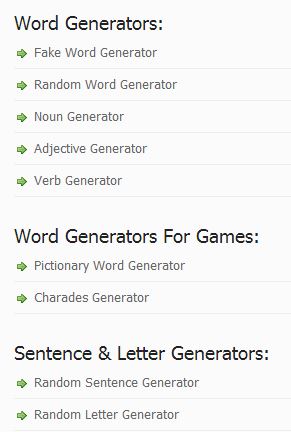
When you visit the site, on the right side, there is a list of word generators to choose from. It looks like this:

WordGenerator1

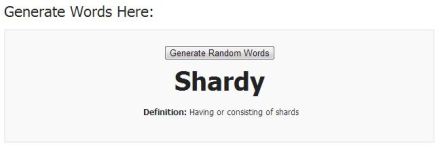
The generators are really easy to use. My favorite word generator on this site is the Random Word Generator. It not only gives you a word, but also the definition.

Capture1

This site also has random name generators. Click on Name Generator at the top of the site and you’ll see a list of name generators on the right.

Capture2

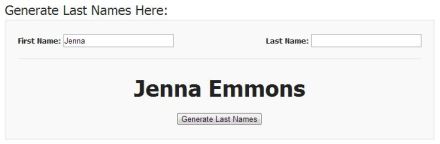
As you can see, it’s not just a plain name generator. You can generate all kinds of names here. The part I like is that you can put in a part of the name and have the rest generated if you want. I have a terrible time making up last names for my characters, but I usually know what I want their first name to be.

For example, I’m starting a book where the main character’s name is Jenna. I can’t think of what Jenna’s last name should be. So, I can use the Last Name Generator, enter Jenna as the first name and click Generate.

Capture3

Super useful!

Creative Random Word Generator

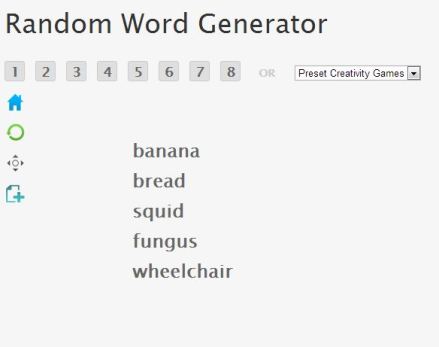
This one is more straight forward, with just some random words being generated. However, you can generate multiple random words at once by clicking on the numbers. Sometimes I find it handy to generate 5 words and try to use them all in my story, chapter, poem, or whatever I’m working on. So I can click on the 5 tile and get 5 words.

Capture4

I might use each word at the start of a paragraph, chapter, scene, or other part of my story to give me a kick in the pants to get going!

I hope you like the resources this week, check back next week for more Resource Saturday goodies!

Happy Writing!

~ Eileen 🙂
Resource Saturdays: How To Write A Book Now

Hi Everyone!

This week, I was looking for some ideas on how to organize my novels and how to better outline the plot and characters. I found a great website that I really think you’re going to like.

How to Write a Book Now

This website has so many great ideas, tips, and hints, that I just had to share it with you this week. From Plot Outlining to Character Development, this site has tons of ideas and advice.

For novel ideas, go to this page and scroll down to the Fun With Plot Summaries section. Some great ideas live here, the possibilities are endless!

Need tips on Character Development, take a peek at this page: How to Create Characters that are Believable and Memorable

Or check out my favorite part, How to Create a Plot Outline in 8 Easy Steps

Finish it all up with Writing an Outline of Your Novel

There are tons of great ideas and tips on this website, I recommend you book mark it, or visit my Resources Page

HowTo WriteABookNow for the link at any time!

Happy Writing!

~ Eileen 🙂